云原生设备管理

引言

在云原生技术演进的道路上,设备管理始终是支撑 AI 训练、高性能计算等关键负载的核心能力。早期的 Kubernetes 曾通过alpha.kubernetes.io/nvidia-gpu这类原生资源支持 GPU 设备,但这种硬编码方式存在明显局限性——每新增一种硬件类型都需要修改 Kubernetes 核心代码,不仅给社区维护带来巨大压力,更难以应对日益丰富的异构计算场景

这一困境在 Kubernetes v1.8 版本迎来转机,其引入的 Device Plugin 机制通过标准化的 gRPC 接口,设备厂商可为 GPU、FPGA、RDMA 网卡等专用硬件开发独立插件,无需修改核心代码即可完成设备集成。这种设计既降低了生态参与门槛,又为 InfiniBand、TPU 等新兴硬件铺平了道路

但当我们实际创建多机训练任务时,仍会产生更深层的疑问:平台如何将 nvidia.com/gpu 这类自定义资源暴露给调度器?Kubelet 如何确保设备资源的正确分配?容器运行时又如何完成最终设备的挂载?这些机制共同构成了云原生设备管理的完整闭环

接下来让我们自上而下的深入这套机制的实现原理,试图解答以上问题

Device Plugin 实现解析(以 Nvidia Device Plugin 为例)

首先我们来介绍下 Device Plugin 的实现

插件架构与 gRPC 接口规范

Device Plugin 机制通过提供一个简单而强大的接口——Device Plugin Interface,实现了对这些硬件资源的抽象和管理。通过实现这个接口,第三方供应商或用户可以开发自己的 Device Plugin,从而将特定的硬件资源集成到 Kubernetes 集群中

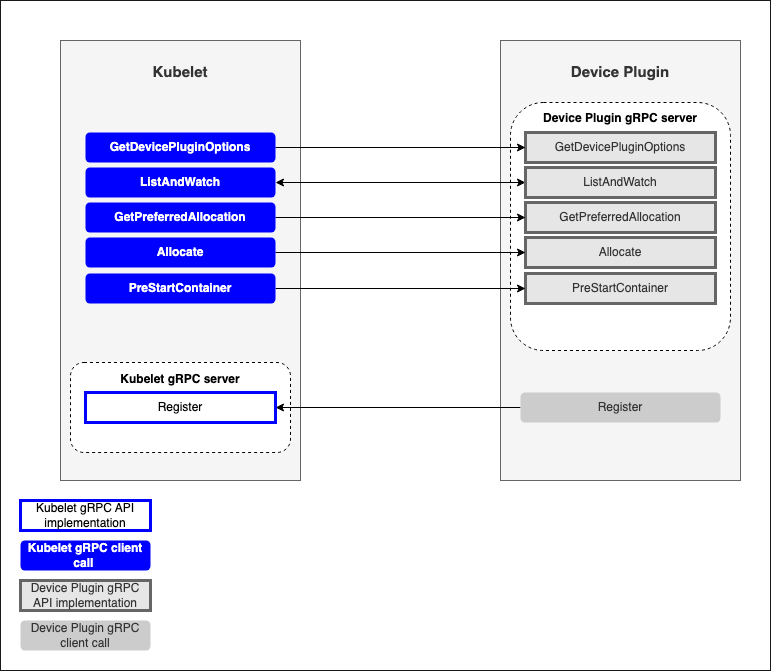
要进行设备管理,Device Plugin 插件需要实现以下接口:

  • GetDevicePluginOptions:这个接口用于获取设备插件的信息,可以在其返回的响应中指定一些设备插件的配置选项,可以看做是插件的元数据

  • **ListAndWatch**:该接口用于列出可用的设备并持续监视这些设备的状态变化

  • GetPreferredAllocation:将分配偏好信息提供给 Kubelet ,以便 Kubelet 在分配时可以做出更好的选择

  • **Allocate**:该接口用于向设备插件请求分配指定数量的设备资源

  • PreStartContainer: 该接口在容器启动之前调用,用于配置容器使用的设备资源

只有 ListAndWatch 和 Allocate 两个接口是必须的,其他都为可选接口

第三方实现的 Device Plugin 实现并暴露这些接口,通常使用 DaemonSet 的形式部署于集群中,通过 Socket 与本机 Kubelet 进行通信,从而实现本机特定资源的暴露与分配

Device Plugin 核心逻辑实现

我们以 Nvidia 官方的 https://github.com/NVIDIA/k8s-device-plugin 为例,介绍 Device Plugin 核心逻辑的示例实现

ListAndWatch
1
2
3
4
5
6
7
8
9
10
11
12
13
14
15
16
17
18
19
// ListAndWatch lists devices and update that list according to the health status  
func (plugin *NvidiaDevicePlugin) ListAndWatch(e *pluginapi.Empty, s pluginapi.DevicePlugin_ListAndWatchServer) error {
if err := s.Send(&pluginapi.ListAndWatchResponse{Devices: plugin.apiDevices()}); err != nil {
return err
}

for {
select {
case <-plugin.stop:
return nil
case d := <-plugin.health:
d.Health = pluginapi.Unhealthy
klog.Infof("'%s' device marked unhealthy: %s", plugin.rm.Resource(), d.ID)
if err := s.Send(&pluginapi.ListAndWatchResponse{Devices: plugin.apiDevices()}); err != nil {
return nil
}
}
}
}

plugin.apiDevices() 通过 NVML 获取底层设备信息,ListAndWatch 方法被调用时,首先返回全量的设备信息

plugin.health 是一个 channel ,在 Device Plugin 初始化后通过 nvml.EventSetCreate() 创建了一个 NVML 事件集,接收 GPU 事件通知,并在遇到关键 XID 错误等情况时,向该 channel 发送设备不健康的通知;收到信息后,该设备会被标记为 Unhealthy ,ListAndWatch 会再次推送全量设备信息至 Kubelet(所以Device Plugin 中的 ListAndWatch 和 K8s Informer 中的不是一个概念)

返回的设备信息格式类似

1
2
3
4
5
6
7
//  struct Device {  
// ID: "GPU-fef8089b-4820-abfc-e83e-94318197576e",
// Health: "Healthy",
// Topology:
// Node:
// ID: 1
// }
Allocate
1
2
3
4
5
6
7
8
9
10
11
12
13
// Allocate which return list of devices.  
func (plugin *NvidiaDevicePlugin) Allocate(ctx context.Context, reqs *pluginapi.AllocateRequest) (*pluginapi.AllocateResponse, error) {
responses := pluginapi.AllocateResponse{}
for _, req := range reqs.ContainerRequests {
if err := plugin.rm.ValidateRequest(req.DevicesIDs); err != nil {
return nil, fmt.Errorf("invalid allocation request for %q: %w", plugin.rm.Resource(), err)
} response, err := plugin.getAllocateResponse(req.DevicesIDs)
if err != nil {
return nil, fmt.Errorf("failed to get allocate response: %v", err)
} responses.ContainerResponses = append(responses.ContainerResponses, response)
}
return &responses, nil
}

Allocate 函数接收 AllocateRequest ,其内容为一个 DeviceID 的列表。例如,当我们申请一个 nvidia.com/gpu: 2 的 Pod 时,Kubelet 发送的 AllocateRequest 中的 DeviceID 列表就应包含两个 Device ID

Allocate 返回的 AllocateResponse 基本结构如下:

1
2
3
4
5
6
7
8
9
10
11
12
13
14
type ContainerAllocateResponse struct {  
// List of environment variable to be set in the container to access one of more devices.
Envs map[string]string `protobuf:"bytes,1,rep,name=envs,proto3" json:"envs,omitempty" protobuf_key:"bytes,1,opt,name=key,proto3" protobuf_val:"bytes,2,opt,name=value,proto3"`
// Mounts for the container.
Mounts []*Mount `protobuf:"bytes,2,rep,name=mounts,proto3" json:"mounts,omitempty"`
// Devices for the container.
Devices []*DeviceSpec `protobuf:"bytes,3,rep,name=devices,proto3" json:"devices,omitempty"`
// Container annotations to pass to the container runtime
Annotations map[string]string `protobuf:"bytes,4,rep,name=annotations,proto3" json:"annotations,omitempty" protobuf_key:"bytes,1,opt,name=key,proto3" protobuf_val:"bytes,2,opt,name=value,proto3"`
// CDI devices for the container.
CDIDevices []*CDIDevice `protobuf:"bytes,5,rep,name=cdi_devices,json=cdiDevices,proto3" json:"cdi_devices,omitempty"`
XXX_NoUnkeyedLiteral struct{} `json:"-"`
XXX_sizecache int32 `json:"-"`
}

通过以上定义,我们可以得知 DevicePlugin 可以添加的 Container 定义有:

  • Envs 环境变量
  • Mounts 挂载路径
  • Devices 设备信息
  • Annotations 容器注解信息(注意此 Annotation 非 K8s 资源中的 Annotation)
  • CDIDevices CDI设备信息
    这些信息会传递给底层的 ContainerRuntime ,以供挂载设备

plugin.rm.ValidateRequest 会验证请求中的 DeviceID 是否符合资源管理器配置和指定的共享策略

plugin.getAllocateResponse 负责添加具体的容器定义,例如 plugin.updateResponseForDeviceListEnvvar(response, deviceIDs...) 就会注入NVIDIA_VISIBLE_DEVICES 环境变量

1
2
3
4
5
6
7
8
9
10
11
12
13
14
15
16
17
18
19
20
21
22
23
24
25
26
func (plugin *NvidiaDevicePlugin) getAllocateResponse(requestIds []string) (*pluginapi.ContainerAllocateResponse, error) {  
deviceIDs := plugin.deviceIDsFromAnnotatedDeviceIDs(requestIds)

// Create an empty response that will be updated as required below.
response := &pluginapi.ContainerAllocateResponse{
Envs: make(map[string]string),
} if plugin.deviceListStrategies.IsCDIEnabled() {
responseID := uuid.New().String()
if err := plugin.updateResponseForCDI(response, responseID, deviceIDs...); err != nil {
return nil, fmt.Errorf("failed to get allocate response for CDI: %v", err)
} } if plugin.deviceListStrategies.Includes(spec.DeviceListStrategyEnvvar) {
plugin.updateResponseForDeviceListEnvvar(response, deviceIDs...)
} if plugin.deviceListStrategies.Includes(spec.DeviceListStrategyVolumeMounts) {
plugin.updateResponseForDeviceMounts(response, deviceIDs...)
} if plugin.config.Sharing.SharingStrategy() == spec.SharingStrategyMPS {
plugin.updateResponseForMPS(response)
} if *plugin.config.Flags.Plugin.PassDeviceSpecs {
response.Devices = append(response.Devices, plugin.apiDeviceSpecs(*plugin.config.Flags.NvidiaDriverRoot, requestIds)...)
} if *plugin.config.Flags.GDSEnabled {
response.Envs["NVIDIA_GDS"] = "enabled"
}
if *plugin.config.Flags.MOFEDEnabled {
response.Envs["NVIDIA_MOFED"] = "enabled"
}
return response, nil
}

容器运行时层实现(以 Nvidia Container Runtime 为例)

NVIDIA 提供了 nvidia-container-toolkit 来处理如何将 GPU 分配给容器的问题
核心组件有以下三个:

  • nvidia-container-runtime
  • nvidia-container-runtime-hook
  • nvidia-container-cli

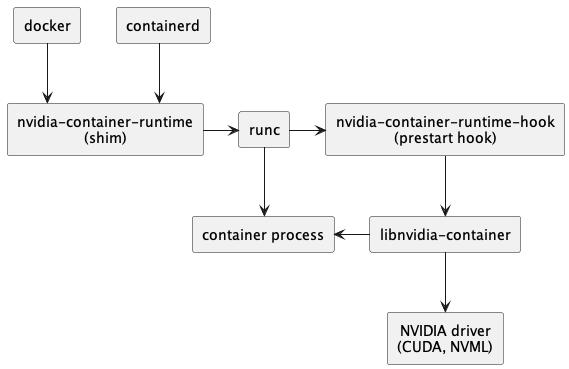
首先我们需要将 docker/containerd 的 runtime 设置为nvidia-container-runtime,此后整个调用链就如下所示

接下来具体分析每个组件的作用

nvidia-container-runtime

在 GPU 节点中,我们通常会对 docker/containerd 做以下设置,使默认 Runtime 从 RunC 变更为 nvidia-container-runtime

1
2
3
4
5
6
7
8
9
10
11
12
13
14
15
16
17
18
19
20
21
22
23
24
25
26
Docker
# vi /etc/docker/daemon.json
​
{
   "default-runtime": "nvidia",
   "runtimes": {
       "nvidia": {
           "path": "/usr/bin/nvidia-container-runtime",
           "runtimeArgs": []
      }
  }
}

Containerd
# vi /etc/containerd/config.toml

[plugins.'io.containerd.grpc.v1.cri'.containerd]
default_runtime_name = 'nvidia'
[plugins.'io.containerd.grpc.v1.cri'.containerd.runtimes]
[plugins.'io.containerd.grpc.v1.cri'.containerd.runtimes.nvidia]
privileged_without_host_devices = false
runtime_engine = ''
runtime_root = ''
runtime_type = 'io.containerd.runc.v2'
[plugins.'io.containerd.grpc.v1.cri'.containerd.runtimes.nvidia.options]
BinaryName = '/usr/bin/nvidia-container-runtime'

docker/containerd 调用 RunC 创建容器时,会将 docker/containerd 收到的信息解析,组装成 OCI Spec,然后再往下传递。而 nvidia-container-runtime 的作用就是修改容器 Spec,往其中添加一个 prestart hook,这个 hook 就是 nvidia-container-runtime-hook

1
2
3
4
5
6
7
8
9
10
11
12
13
14
15
16
17
18
19
20
21
22
23
// Modify applies the required modification to the incoming OCI spec, inserting the nvidia-container-runtime-hook  
// as a prestart hook.
func (m stableRuntimeModifier) Modify(spec *specs.Spec) error {
// If an NVIDIA Container Runtime Hook already exists, we don't make any modifications to the spec.
if spec.Hooks != nil {
for _, hook := range spec.Hooks.Prestart {
hook := hook
if isNVIDIAContainerRuntimeHook(&hook) {
m.logger.Infof("Existing nvidia prestart hook (%v) found in OCI spec", hook.Path)
return nil
}
} }
path := m.nvidiaContainerRuntimeHookPath
m.logger.Infof("Using prestart hook path: %v", path)
args := []string{filepath.Base(path)}
if spec.Hooks == nil {
spec.Hooks = &specs.Hooks{}
} spec.Hooks.Prestart = append(spec.Hooks.Prestart, specs.Hook{
Path: path,
Args: append(args, "prestart"),
})
return nil
}

也就是说 nvidia-container-runtime 其实基本没有任何逻辑,仅起到中转作用

nvidia-container-runtime-hook

nvidia-container-runtime-hook 包含了给容器分配 GPU 的核心逻辑,主要分为两部分:

  1. 从容器 OCI Spec 的 mounts 和 env 中解析 GPU 信息
    mounts 对应前面 device plugin 中设置的 Mount 和 Device,env 则对应 Env
  2. 调用 nvidia-container-cli configure 命令,保证容器内可以使用被指定的 GPU 以及对应能力
    1
    2
    3
    4
    5
    6
    7
    8
    9
    10
    11
    12
    13
    14
    15
    16
    17
    18
    19
    20
    21
    22
    23
    24
    25
    26
    27
    28
    29
    30
    31
    32
    33
    34
    35
    36
    37
    38
    39
    40
    41
    42
    43
    44
    45
    46
    47
    48
    49
    50
    51
    52
    53
    54
    55
    56
    57
    58
    59
    60
    61
    62
    63
    64
    65
    66
    67
    68
    69
    70
    71
    72
    73
    74
    func doPrestart() {  
    var err error

    defer exit()
    log.SetFlags(0)

    hook, err := getHookConfig()
    if err != nil || hook == nil {
    log.Panicln("error getting hook config:", err)
    } cli := hook.NVIDIAContainerCLIConfig

    container := hook.getContainerConfig()
    nvidia := container.Nvidia
    if nvidia == nil {
    // Not a GPU container, nothing to do.
    return
    }

    if !hook.NVIDIAContainerRuntimeHookConfig.SkipModeDetection && info.ResolveAutoMode(&logInterceptor{}, hook.NVIDIAContainerRuntimeConfig.Mode, container.Image) != "legacy" {
    log.Panicln("invoking the NVIDIA Container Runtime Hook directly (e.g. specifying the docker --gpus flag) is not supported. Please use the NVIDIA Container Runtime (e.g. specify the --runtime=nvidia flag) instead.")
    }
    rootfs := getRootfsPath(container)

    args := []string{getCLIPath(cli)}
    if cli.Root != "" {
    args = append(args, fmt.Sprintf("--root=%s", cli.Root))
    } if cli.LoadKmods {
    args = append(args, "--load-kmods")
    } if hook.Features.DisableImexChannelCreation.IsEnabled() {
    args = append(args, "--no-create-imex-channels")
    } if cli.NoPivot {
    args = append(args, "--no-pivot")
    } if *debugflag {
    args = append(args, "--debug=/dev/stderr")
    } else if cli.Debug != "" {
    args = append(args, fmt.Sprintf("--debug=%s", cli.Debug))
    } if cli.Ldcache != "" {
    args = append(args, fmt.Sprintf("--ldcache=%s", cli.Ldcache))
    } if cli.User != "" {
    args = append(args, fmt.Sprintf("--user=%s", cli.User))
    } args = append(args, "configure")

    args = append(args, hook.nvidiaContainerCliCUDACompatModeFlags()...)

    if ldconfigPath := cli.NormalizeLDConfigPath(); ldconfigPath != "" {
    args = append(args, fmt.Sprintf("--ldconfig=%s", ldconfigPath))
    } if cli.NoCgroups {
    args = append(args, "--no-cgroups")
    } if devicesString := strings.Join(nvidia.Devices, ","); len(devicesString) > 0 {
    args = append(args, fmt.Sprintf("--device=%s", devicesString))
    } if len(nvidia.MigConfigDevices) > 0 {
    args = append(args, fmt.Sprintf("--mig-config=%s", nvidia.MigConfigDevices))
    } if len(nvidia.MigMonitorDevices) > 0 {
    args = append(args, fmt.Sprintf("--mig-monitor=%s", nvidia.MigMonitorDevices))
    } if imexString := strings.Join(nvidia.ImexChannels, ","); len(imexString) > 0 {
    args = append(args, fmt.Sprintf("--imex-channel=%s", imexString))
    }
    for _, cap := range strings.Split(nvidia.DriverCapabilities, ",") {
    if len(cap) == 0 {
    break
    }
    args = append(args, capabilityToCLI(cap))
    }
    for _, req := range nvidia.Requirements {
    args = append(args, fmt.Sprintf("--require=%s", req))
    }
    args = append(args, fmt.Sprintf("--pid=%s", strconv.FormatUint(uint64(container.Pid), 10)))
    args = append(args, rootfs)

    env := append(os.Environ(), cli.Environment...)
    //nolint:gosec // TODO: Can we harden this so that there is less risk of command injection?
    err = syscall.Exec(args[0], args, env)
    log.Panicln("exec failed:", err)
    }
    可以看到,nvidia-container-runtime-hook 的主要逻辑就是根据 OCI Spec 组装 nvidia-container-cli configure 命令及参数,也就是说nvidia-container-runtime-hook 最终还是调用 nvidia-container-cli 来实现的给容器分配 GPU 能力的
nvidia-container-cli

nvidia-container-cli 是一个命令行工具,用于配置 Linux 容器对 GPU 硬件的使用
其提供了三个命令

  • list:打印 NVIDIA 驱动库及路径
  • info:打印所有 NVIDIA GPU 设备
  • configure:进入给定进程的命名空间,执行必要操作保证容器内可以使用被指定的 GPU 以及对应能力(指定 NVIDIA 驱动库)

一般主要使用 configure 命令,它将 NVIDIA GPU Driver、CUDA Driver 等驱动库的 so 文件和 GPU 设备信息,通过文件挂载的方式映射到容器中

1
2
3
4
5
6
7
8
9
10
11
12
13
14
15
16
17
18
19
20
21
22
23
24
25
26
27
28
Usage: nvidia-container-cli configure [OPTION...] ROOTFS
Configure a container with GPU support by exposing device drivers to it.

This command enters the namespace of the container process referred by PID (or
the current parent process if none specified) and performs the necessary steps
to ensure that the given capabilities are available inside the container.
It is assumed that the container has been created but not yet started, and the
host filesystem is accessible (i.e. chroot/pivot_root hasn't been called).

Options:
-?, --help Give this help list
-c, --compute Enable compute capability
--compat32 Enable 32bits compatibility
-d, --device=ID Device UUID(s) or index(es) to isolate
-D, --display Enable display capability
-g, --graphics Enable graphics capability
-l, --ldconfig=PATH Path to the ldconfig binary
--mig-config=ID Enable configuration of MIG devices
--mig-monitor=ID Enable monitoring of MIG devices
-n, --ngx Enable ngx capability
--no-cgroups Don't use cgroup enforcement
--no-devbind Don't bind mount devices
-p, --pid=PID Container PID
-r, --require=EXPR Check container requirements
-u, --utility Enable utility capability
--usage Give a short usage message
-v, --video Enable video capability
-V, --version Print program version

Kubelet Device Manager 核心机制

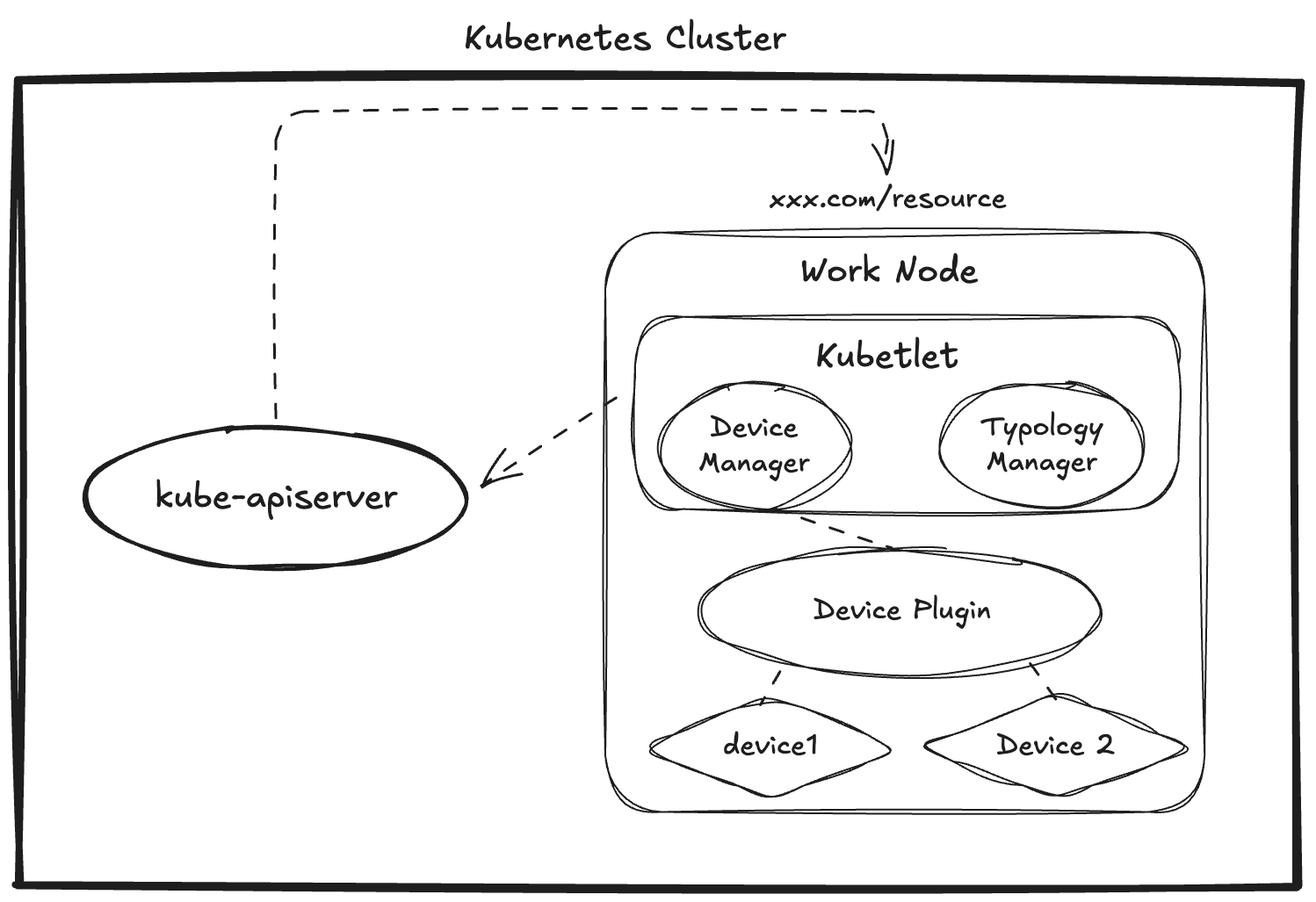
Device Manager 通过 Socket 与 Device Plugin 对接,负责发现、上报及分配设备资源,确保 Pod 能够正常使用设备资源

获取资源状态

在 Device Plugin 向 Kubelet 注册自身后,Kubelet 会调用 Device Plugin 接口以获取设备状态

1
2
3
4
5
6
7
8
9
10
11
12
13
14
15
16
17
18
19
20
21
22
23
24
25
26
27
28
29
30
31
32
33
34
35
36
37
38
39
40
41
42
43
44
45
46
47
48
49
50
51
52
53
54
55
56
57
58
59
60
61
62
63
64
65
66
67
68
69
70
71
72
73
74
75
76
77
78
79
func (c *client) Run() {
stream, err := c.client.ListAndWatch(context.Background(), &api.Empty{})
if err != nil {
klog.ErrorS(err, "ListAndWatch ended unexpectedly for device plugin", "resource", c.resource)
return
}

for {
response, err := stream.Recv()
if err != nil {
klog.ErrorS(err, "ListAndWatch ended unexpectedly for device plugin", "resource", c.resource)
return
}
klog.V(2).InfoS("State pushed for device plugin", "resource", c.resource, "resourceCapacity", len(response.Devices))
c.handler.PluginListAndWatchReceiver(c.resource, response)
}
}

func (m *ManagerImpl) PluginListAndWatchReceiver(resourceName string, resp *pluginapi.ListAndWatchResponse) {
var devices []pluginapi.Device
for _, d := range resp.Devices {
devices = append(devices, *d)
}
m.genericDeviceUpdateCallback(resourceName, devices)
}

func (m *ManagerImpl) genericDeviceUpdateCallback(resourceName string, devices []pluginapi.Device) {
healthyCount := 0
m.mutex.Lock()
m.healthyDevices[resourceName] = sets.New[string]()
m.unhealthyDevices[resourceName] = sets.New[string]()
oldDevices := m.allDevices[resourceName]
podsToUpdate := sets.New[string]()
m.allDevices[resourceName] = make(map[string]pluginapi.Device)
for _, dev := range devices {

if utilfeature.DefaultFeatureGate.Enabled(features.ResourceHealthStatus) {
// compare with old device's health and send update to the channel if needed
updatePodUIDFn := func(deviceID string) {
podUID, _ := m.podDevices.getPodAndContainerForDevice(deviceID)
if podUID != "" {
podsToUpdate.Insert(podUID)
}
}
if oldDev, ok := oldDevices[dev.ID]; ok {
if oldDev.Health != dev.Health {
updatePodUIDFn(dev.ID)
}
} else {
updatePodUIDFn(dev.ID)
}
}

m.allDevices[resourceName][dev.ID] = dev
if dev.Health == pluginapi.Healthy {
m.healthyDevices[resourceName].Insert(dev.ID)
healthyCount++
} else {
m.unhealthyDevices[resourceName].Insert(dev.ID)
}
}
m.mutex.Unlock()

if utilfeature.DefaultFeatureGate.Enabled(features.ResourceHealthStatus) {
if len(podsToUpdate) > 0 {
select {
case m.update <- resourceupdates.Update{PodUIDs: podsToUpdate.UnsortedList()}:
default:
klog.ErrorS(goerrors.New("device update channel is full"), "discard pods info", "podsToUpdate", podsToUpdate.UnsortedList())
}
}
}

if err := m.writeCheckpoint(); err != nil {
klog.ErrorS(err, "Writing checkpoint encountered")
}
klog.V(2).InfoS("Processed device updates for resource", "resourceName", resourceName, "totalCount", len(devices), "healthyCount", healthyCount)
}

Device Manager 通过对于 Device Plugin 的调用和连接情况变更维护内存中的设备状态,主要维护一下三个 map

  • healthyDevices
  • unhealthyDevices
  • allDevices
    同时,Device Manger 拥有 CheckPoint 机制,在状态变更后会将内存维护的设备状态同步至本机文件中,以便在 Kubelet 重启后能够维护状态一致性
上报资源

Kubelet 周期性的上报节点资源至 kube-apiserver ,除了CPU/内存等资源信息,Kubelet 还会调用 Device Manager 的 GetCapacity() 来获取自定义设备信息的状态,包括 capacity 和 allocatable 信息

1
2
3
4
5
6
7
8
9
10
11
12
13
14
15
16
17
18
19
20
21
22
23
24
25
26
27
28
29
30
31
32
33
34
35
36
37
38
39
40
41
42
43
44
45
46
47
48
49
func (m *ManagerImpl) GetCapacity() (v1.ResourceList, v1.ResourceList, []string) {
needsUpdateCheckpoint := false
var capacity = v1.ResourceList{}
var allocatable = v1.ResourceList{}
deletedResources := sets.New[string]()
m.mutex.Lock()
for resourceName, devices := range m.healthyDevices {
eI, ok := m.endpoints[resourceName]
if (ok && eI.e.stopGracePeriodExpired()) || !ok {
// The resources contained in endpoints and (un)healthyDevices
// should always be consistent. Otherwise, we run with the risk
// of failing to garbage collect non-existing resources or devices.
if !ok {
klog.InfoS("Unexpected: healthyDevices and endpoints are out of sync")
}
delete(m.endpoints, resourceName)
delete(m.healthyDevices, resourceName)
deletedResources.Insert(resourceName)
needsUpdateCheckpoint = true
} else {
capacity[v1.ResourceName(resourceName)] = *resource.NewQuantity(int64(devices.Len()), resource.DecimalSI)
allocatable[v1.ResourceName(resourceName)] = *resource.NewQuantity(int64(devices.Len()), resource.DecimalSI)
}
}
for resourceName, devices := range m.unhealthyDevices {
eI, ok := m.endpoints[resourceName]
if (ok && eI.e.stopGracePeriodExpired()) || !ok {
if !ok {
klog.InfoS("Unexpected: unhealthyDevices and endpoints became out of sync")
}
delete(m.endpoints, resourceName)
delete(m.unhealthyDevices, resourceName)
deletedResources.Insert(resourceName)
needsUpdateCheckpoint = true
} else {
capacityCount := capacity[v1.ResourceName(resourceName)]
unhealthyCount := *resource.NewQuantity(int64(devices.Len()), resource.DecimalSI)
capacityCount.Add(unhealthyCount)
capacity[v1.ResourceName(resourceName)] = capacityCount
}
}
m.mutex.Unlock()
if needsUpdateCheckpoint {
if err := m.writeCheckpoint(); err != nil {
klog.ErrorS(err, "Failed to write checkpoint file")
}
}
return capacity, allocatable, deletedResources.UnsortedList()
}

GetCapacity() 通过 Device Manager 维护的设备 unhealthy 和 healthy 列表来进行设备状态判断,其中

  • allocatable = len(healthyDevices)
  • capacity = len(healthyDevices) + len(unhealthyDevices)
分配

Device Manager 进行分配时考虑到使用 initContainer 的场景,如果 initContainer 是 unrestartable 的场景,会将分配的设备存储在 devicesToReuse 结构中,在 initContainer 销毁后将该 Device 优先复用给 Pod 内的其他容器

1
2
3
4
5
6
7
8
9
10
11
12
13
14
15
16
17
18
19
20
21
22
23
24
25
26
27
28
29
func (m *ManagerImpl) Allocate(pod *v1.Pod, container *v1.Container) error {
if _, ok := m.devicesToReuse[string(pod.UID)]; !ok {
m.devicesToReuse[string(pod.UID)] = make(map[string]sets.Set[string])
}
for podUID := range m.devicesToReuse {
if podUID != string(pod.UID) {
delete(m.devicesToReuse, podUID)
}
}

for _, initContainer := range pod.Spec.InitContainers {
if container.Name == initContainer.Name {
if err := m.allocateContainerResources(pod, container, m.devicesToReuse[string(pod.UID)]); err != nil {
return err
}
if !podutil.IsRestartableInitContainer(&initContainer) {
m.podDevices.addContainerAllocatedResources(string(pod.UID), container.Name, m.devicesToReuse[string(pod.UID)])
} else {
m.podDevices.removeContainerAllocatedResources(string(pod.UID), container.Name, m.devicesToReuse[string(pod.UID)])
}
return nil
}
}
if err := m.allocateContainerResources(pod, container, m.devicesToReuse[string(pod.UID)]); err != nil {
return err
}
m.podDevices.removeContainerAllocatedResources(string(pod.UID), container.Name, m.devicesToReuse[string(pod.UID)])
return nil
}

allocateContainerResources 实现了分配设备的主要逻辑,其内部实现比较繁长,大致流程如下

  • 调用 devicesToAllocate 获取待分配的设备

    • 根据 NumaAffinity 进行设备排序(对齐CPU、Memory和其他设备),排序结果为 aligned, unaligned, noAffinity
    • 按照 aligned, unaligned, noAffinity 的设备依次添加待分配的设备,在其中还会调用 Device Plugin 的 GetPreferredAllocation 接口进行内部排序
  • 调用 Device Plugin Allocate 接口进行资源分配

局限与发展

在当前我们对于 Kubernetes 中设备管理的粒度越来越精细和对设备资源利用率要求越来越高的背景下,Kubernetes 当前的设备管理方案表现出了以下弊端:

  1. 资源选择的精细程度有限:只能通过一些节点属性和标签来对节点上的资源类型进行相对粗略的选择,无法进行更精细的控制
  2. 缺乏有效的调度反馈机制:设备插件和 kube-scheduler 之间缺乏有效的反馈回路。这意味着,即使 kube-scheduler 为一个待调度的 Pod 找到了看似合适的节点,设备插件也无法根据节点的就绪状态等关键因素进行进一步的“校验”,这可能导致 Pod 被错误地调度到尚未完全准备好接收新资源的“未就绪”节点上
  3. Kubernetes 只允许通过 Kubelet 来分配设备,这样就导致无法获得全局最优的资源编排,也就是从根本上无法发挥最大的资源效能。比如一个集群内有两台节点,都有相同的设备,剩余的可分配设备数量相等,但是实际上两个节点上的设备所在的硬件拓扑会导致 Pod 的运行时效果差异较大,没有调度器介入的情况下,很有可能无法抵消这种差异
  4. 当前 Kubelet 所能处理的最大 NUMA 节点个数是 8。若 NUMA 节点数超过 8, 枚举可能的 NUMA 亲和性并为之生成提示时会发生状态爆炸
针对于以上问题,Kubernetes 在 1.32 默认开启了 prefer-closest-numa-nodes 策略,使拓扑管理器尽可能偏向于彼此之间距离较短的一组 NUMA 节点; 在 Kubernetes 1.33 版本提出了下一代的 DRA(动态资源分配)方案,与调度器进行联动,不过该方案在当前最新版本中仍处于 beta 状态,其架构还在演进当中,需要持续关注

Ref:

  1. https://github.com/kubernetes/design-proposals-archive/blob/main/resource-management/device-plugin.md
  2. https://github.com/opencontainers/runtime-spec/blob/main/config.md#prestart
  3. https://www.lixueduan.com/posts/kubernetes/22-pod-use-gpu-in-k8s-analyze/
  4. https://www.icviews.cn/semiCommunity/postDetail/7936